# MCP
# 为什么需要 MCP?
MCP 是一个万能接口,统一的调用方式,相当于 SpringCloud 的 OpenFeign,MCP 是用于大模型应用与外部工具 / 数据源之间的调用,是对 ToolCalling 进一步的加强版,这个是 A2A 的基础。
实际上 MCP 看起来就是一堆 ToolCalling 的集合,比如百度地图的 MCP 包含了
# MCP 的两种模式
# STDIO
客户端会启动一个子进程来运行 MCP 服务器。两者通过操作系统的标准输入流和标准输出流来交换 JSON-RPC 格式的消息。
# SSE
SSE 是一种基于 HTTP 的轻量级推送技术。MCP 的 SSE 模式通常采用双向通信:
- 客户端通过 HTTP 向服务器发送请求(如调用工具)。
- 服务器通过一个持久的 SSE 连接向客户端主动推送响应或事件。
- 这就实现了客户端与远程服务器之间的实时、异步通信。
# Server 示例
from mcp.server.fastmcp import FastMCP | |
fast_mcp = FastMCP("demo") | |
# mcp = MCPServer("demo") | |
@fast_mcp.tool() | |
def add(a: int, b: int) -> int: | |
return a + b | |
@fast_mcp.resource("greeting://{name}") | |
def greet(name: str) -> str: | |
return f"Hello, {name}!" | |
if __name__ == '__main__': | |
fast_mcp.run(transport="stdio") |
# 对称架构
实际上 MCP 有服务端与客户端,本质上是一个 C/S 架构,一个实例如下:
MCP 的服务端:
# pip install mcp | |
# pip install pywin32 | |
import asyncio | |
from mcp.server.fastmcp import FastMCP | |
# 创建 MCP 实例 | |
mcp = FastMCP("Demo") | |
# 为 MCP 实例添加工具 | |
@mcp.tool() | |
def add(a: int, b: int) -> int: | |
return a + b | |
# 为 MCP 实例添加资源 | |
@mcp.resource("greeting://default") | |
def get_greeting() -> str: | |
return "Hello from static resource!" | |
# 为 MCP 实例添加提示词 | |
@mcp.prompt() | |
def greet_user(name: str, style: str = "friendly") -> str: | |
styles = { | |
"friendly": "写一句友善的问候", | |
"formal": "写一句正式的问候", | |
"casual": "写一句轻松的问候", | |
} | |
return f"为{name}{styles.get(style, styles['friendly'])}" | |
@mcp.tool() | |
async def sayHello() -> str: | |
await asyncio.sleep(0.1) | |
return "hihi你好呀!" | |
if __name__ == "__main__": | |
mcp.run(transport="stdio") |
这里我觉得有点像那个 Controller,通过客户端像服务端请求相关的 tool 并封装为 tool:
import asyncio | |
import json | |
from loguru import logger | |
from mcp.server.fastmcp import FastMCP | |
from TestX.mcp.McpServerByFastMCP import mcp # 如果这是 FastMCP 实例 | |
async def call_weather_tool(mcp_instance: FastMCP): | |
try: | |
# 获取工具函数 | |
tool = mcp_instance._tool_manager._tools.get("sayHello") | |
if not tool: | |
logger.warning(f"工具 'sayHello' 未在服务端注册") | |
return None | |
# 调用工具函数 | |
re_flex = await tool.fn() | |
return re_flex | |
except Exception as exc: | |
logger.error(f"调用 sayHello 工具失败:{str(exc)}") | |
return None | |
async def run_client_demo(): | |
logger.info("初始化 MCP 客户端...") | |
# 调用天气查询工具 | |
weather_data = await call_weather_tool(mcp) | |
if weather_data: | |
print(weather_data) | |
print("-" * 50) | |
if __name__ == "__main__": | |
logger.info("启动 MCP 天气客户端...") | |
asyncio.run(run_client_demo()) |
客户端本质是是在 call_weather_tool 中完成对 tool 工具的获取,主要由以下几步组成:
- 获取工具函数:通过
mcp_instance._tool_manager._tools.get("sayHello")这里获取 function - 通过
re_flex = await tool.fn()直接调用函数。
# 最简单的 MCP 应用 — 使用 LangChain 提供的便携方式
这里是百度地图的 MCP 创建与调用:
import json | |
import asyncio | |
import os | |
from dotenv import load_dotenv | |
from langchain.chat_models import init_chat_model | |
from langchain_mcp_adapters.client import MultiServerMCPClient | |
async def use_baidu_map_with_langchain(): | |
"""使用 LangChain 连接百度地图 MCP 服务器""" | |
# 方式 1:直接使用 JSON 配置 | |
client = MultiServerMCPClient({ | |
"baidu-map": { | |
"command": "npx", | |
"args": ["-y", "@baidumap/mcp-server-baidu-map"], | |
"env": {"BAIDU_MAP_API_KEY": "lwubQy6izAds7D8SpP2a1j4e9qbEin5P"}, | |
"transport": "stdio" | |
} | |
}) | |
# 获取工具 | |
tools = await client.get_tools() | |
print(f"可用工具: {[tool.name for tool in tools]}") | |
for tool in tools: | |
if tool.name == "map_geocode": | |
# 直接调用 | |
result = await tool.ainvoke({"address": "天安门"}) | |
print(f"天安门坐标: {result}") | |
break |
首先他会通过 MultiServerMCPClient 加载了一个服务,实际上是启动了一个子进程,通过配置文件我们可以了解到:
npx -y @baidumap/mcp-server-baidu-map |
就是这样的一段命令,通过 npx 来启动百度地图的 MCP 服务,实际上我们也可以通过 py 代码的形式启动,百度的开源如是写道:
# _*_ coding : utf-8 _*_ | |
# @Time : 2026/8/24 20:08 | |
# @Author : KarryLiu | |
# File : map | |
# @Project : lg-stu | |
# map.py | |
import os | |
import copy | |
import httpx | |
from asyncio import sleep | |
from mcp.server.fastmcp import FastMCP | |
import mcp.types as types | |
import re | |
# 创建 MCP 服务器实例 | |
mcp = FastMCP( | |
name="mcp-server-baidu-maps", | |
instructions="This is a MCP server for Baidu Maps." | |
) | |
""" | |
获取环境变量中的API密钥, 用于调用百度地图API | |
环境变量名为: BAIDU_MAPS_API_KEY, 在客户端侧通过配置文件进行设置传入 | |
获取方式请参考: https://lbsyun.baidu.com/apiconsole/key; | |
""" | |
api_key = os.getenv('BAIDU_MAPS_API_KEY') | |
api_url = "https://api.map.baidu.com" | |
def filter_result(data) -> dict: | |
""" | |
过滤路径规划结果, 用于剔除冗余字段信息, 保证输出给模型的数据更简洁, 避免长距离路径规划场景下chat中断 | |
""" | |
# 创建输入数据的深拷贝以避免修改原始数据 | |
processed_data = copy.deepcopy(data) | |
# 检查是否存在 'result' 键 | |
if 'result' in processed_data: | |
result = processed_data['result'] | |
# 检查 'result' 中是否存在 'routes' 键 | |
if 'routes' in result: | |
for route in result['routes']: | |
# 检查每个 'route' 中是否存在'steps' 键 | |
if 'steps' in route: | |
new_steps = [] | |
for step in route['steps']: | |
# 提取 'instruction' 字段,若不存在则设为空字符串 | |
new_step = { | |
'distance': step.get('distance', ''), | |
'duration': step.get('duration', ''), | |
'instruction': step.get('instruction', '') | |
} | |
new_steps.append(new_step) | |
# 替换原 steps 为仅含 instruction 的新列表 | |
route['steps'] = new_steps | |
return processed_data | |
def is_latlng(text): | |
""" | |
判断输入是否为经纬度坐标. | |
""" | |
# 允许有空格,支持正负号和小数 | |
pattern = r'^\s*([+-]?\d+(?:\.\d+)?)\s*,\s*([+-]?\d+(?:\.\d+)?)\s*$' | |
match = re.match(pattern, text) | |
if not match: | |
return False | |
lat, lng = float(match.group(1)), float(match.group(2)) | |
# 简单经纬度范围校验 | |
return -90 <= lat <= 90 and -180 <= lng <= 180 | |
def mask_api_key(text: str) -> str: | |
""" | |
信息脱敏函数,主要用于给某个字符串脱敏用户的ak | |
可以处理包含API key的复杂字符串,如URL、错误信息等 | |
""" | |
if not text or not api_key: | |
return text | |
# 如果字符串中不包含 api_key,直接返回 | |
if api_key not in text: | |
return text | |
# 计算脱敏后的 API key | |
if len(api_key) <= 8: | |
# 如果 api_key 长度较短,只显示前 2 位和后 2 位 | |
masked_key = api_key[:2] + '*' * (len(api_key) - 4) + api_key[-2:] | |
else: | |
# 如果 api_key 长度较长,显示前 4 位和后 4 位 | |
masked_key = api_key[:4] + '*' * (len(api_key) - 8) + api_key[-4:] | |
# 替换文本中所有出现的 api_key | |
return text.replace(api_key, masked_key) | |
async def map_geocode( | |
name: str, arguments: dict | |
) -> list[types.TextContent | types.ImageContent | types.EmbeddedResource]: | |
""" | |
地理编码服务, 将地址解析为对应的位置坐标. | |
""" | |
try: | |
address = arguments.get("address", "") | |
is_china = arguments.get("is_china", "true") | |
url = "" | |
# 调用百度 API | |
if is_china == "true": | |
url = f"{api_url}/geocoding/v3/" | |
else: | |
url = f"{api_url}/api_geocoding_abroad/v1/" | |
# 设置请求参数 | |
params = { | |
"ak": f"{api_key}", | |
"output": "json", | |
"address": f"{address}", | |
"from": "py_mcp" | |
} | |
async with httpx.AsyncClient() as client: | |
response = await client.get(url, params=params) | |
response.raise_for_status() | |
result = response.json() | |
if result.get("status") != 0: | |
error_msg = result.get("message", "unknown error") | |
raise Exception(f"API response error: {mask_api_key(error_msg)}") | |
return [types.TextContent(type="text", text=response.text)] | |
except httpx.HTTPError as e: | |
raise Exception(f"HTTP request failed: {str(e)}") from e | |
except KeyError as e: | |
raise Exception(f"Failed to parse reponse: {str(e)}") from e | |
async def map_reverse_geocode( | |
name: str, arguments: dict | |
) -> list[types.TextContent | types.ImageContent | types.EmbeddedResource]: | |
""" | |
逆地理编码服务, 根据纬经度坐标获取对应位置的地址描述. | |
""" | |
try: | |
latitude = arguments.get("latitude", "") | |
longitude = arguments.get("longitude", "") | |
# 调用百度 API | |
url = f"{api_url}/reverse_geocoding/v3/" | |
params = { | |
"ak": f"{api_key}", | |
"output": "json", | |
"location": f"{latitude},{longitude}", | |
"extensions_road": "true", | |
"extensions_poi": "1", | |
"entire_poi": "1", | |
"from": "py_mcp" | |
} | |
async with httpx.AsyncClient() as client: | |
response = await client.get(url, params=params) | |
response.raise_for_status() | |
result = response.json() | |
if result.get("status") != 0: | |
error_msg = result.get("message", "unknown error") | |
raise Exception(f"API response error: {mask_api_key(error_msg)}") | |
return [types.TextContent(type="text", text=response.text)] | |
except httpx.HTTPError as e: | |
raise Exception(f"HTTP request failed: {str(e)}") from e | |
except KeyError as e: | |
raise Exception(f"Failed to parse reponse: {str(e)}") from e | |
async def map_search_places( | |
name: str, arguments: dict | |
) -> list[types.TextContent | types.ImageContent | types.EmbeddedResource]: | |
""" | |
地点检索服务, 支持检索城市内的地点信息或圆形区域内的周边地点信息. | |
""" | |
try: | |
query = arguments.get("query", "") | |
tag = arguments.get("tag", "") | |
region = arguments.get("region", "全国") # 默认检索全国,防止出错 | |
location = arguments.get("location", "") | |
radius = arguments.get("radius", "") | |
language = arguments.get("language", "") | |
is_china = arguments.get("is_china", "true") | |
url = "" | |
params = { | |
"ak": f"{api_key}", | |
"output": "json", | |
"query": f"{query}", | |
"type": f"{tag}", | |
# "photo_show": "true", | |
"region_limit": "true", | |
"scope": 2, | |
"from": "py_mcp", | |
"language": f"{language}" | |
} | |
if is_china == "true": | |
if location: | |
url = f"{api_url}/place/v3/around" | |
params["location"] = f"{location}" | |
params["radius"] = f"{radius}" | |
else: | |
url = f"{api_url}/place/v3/region" | |
params["region"] = f"{region}" | |
elif is_china == "false": | |
url = f"{api_url}/place_abroad/v1/search" | |
if location: | |
params["location"] = f"{location}" | |
params["radius"] = f"{radius}" | |
else: | |
params["region"] = f"{region}" | |
else: | |
raise Exception("input `is_china` invaild, please reinput `is_china` with `true` or `false`") | |
async with httpx.AsyncClient() as client: | |
response = await client.get(url, params=params) | |
response.raise_for_status() | |
result = response.json() | |
if result.get("status") != 0: | |
error_msg = result.get("message", "unknown error") | |
raise Exception(f"API response error: {mask_api_key(error_msg)}") | |
return [types.TextContent(type="text", text=response.text)] | |
except httpx.HTTPError as e: | |
raise Exception(f"HTTP request failed: {str(e)}") from e | |
except KeyError as e: | |
raise Exception(f"Failed to parse reponse: {str(e)}") from e | |
async def map_place_details( | |
name: str, arguments: dict | |
) -> list[types.TextContent | types.ImageContent | types.EmbeddedResource]: | |
""" | |
地点详情检索服务, 获取指定POI的详情信息. | |
""" | |
try: | |
uid = arguments.get("uid", "") | |
is_china = arguments.get("is_china", "true") | |
url = "" | |
if is_china == "true": | |
url = f"{api_url}/place/v2/detail" | |
else: | |
url = f"{api_url}/place_abroad/v1/detail" | |
params = { | |
"ak": f"{api_key}", | |
"output": "json", | |
"uid": f"{uid}", | |
"scope": 2, | |
"from": "py_mcp" | |
} | |
async with httpx.AsyncClient() as client: | |
response = await client.get(url, params=params) | |
response.raise_for_status() | |
result = response.json() | |
if result.get("status") != 0: | |
error_msg = result.get("message", "unknown error") | |
raise Exception(f"API response error: {mask_api_key(error_msg)}") | |
return [types.TextContent(type="text", text=response.text)] | |
except httpx.HTTPError as e: | |
raise Exception(f"HTTP request failed: {str(e)}") from e | |
except KeyError as e: | |
raise Exception(f"Failed to parse reponse: {str(e)}") from e | |
async def map_directions_matrix( | |
name: str, arguments: dict | |
) -> list[types.TextContent | types.ImageContent | types.EmbeddedResource]: | |
""" | |
批量算路服务, 根据起点和终点坐标计算路线规划距离和行驶时间. | |
""" | |
try: | |
origins = arguments.get("origins", "") | |
destinations = arguments.get("destinations", "") | |
model = arguments.get("model", "driving") | |
url = f"{api_url}/routematrix/v2/{model}" | |
params = { | |
"ak": f"{api_key}", | |
"output": "json", | |
"origins": f"{origins}", | |
"destinations": f"{destinations}", | |
"from": "py_mcp" | |
} | |
async with httpx.AsyncClient() as client: | |
response = await client.get(url, params=params) | |
response.raise_for_status() | |
result = response.json() | |
if result.get("status") != 0: | |
error_msg = result.get("message", "unknown error") | |
raise Exception(f"API response error: {mask_api_key(error_msg)}") | |
return [types.TextContent(type="text", text=response.text)] | |
except httpx.HTTPError as e: | |
raise Exception(f"HTTP request failed: {str(e)}") from e | |
except KeyError as e: | |
raise Exception(f"Failed to parse reponse: {str(e)}") from e | |
async def map_directions( | |
name: str, arguments: dict | |
) -> list[types.TextContent | types.ImageContent | types.EmbeddedResource]: | |
""" | |
路线规划服务, 支持驾车、骑行、步行和公交路线规划. | |
""" | |
try: | |
model = arguments.get("model", "driving") | |
origin = arguments.get("origin", "") | |
destination = arguments.get("destination", "") | |
is_china = arguments.get("is_china", "true") | |
url = "" | |
# 检查输入是否为地址文本(不包含逗号) | |
if not is_latlng(origin): | |
# 调用地理编码服务获取起点经纬度 | |
geocode_url = "" | |
if is_china == "true": | |
geocode_url = f"{api_url}/geocoding/v3/" | |
else: | |
geocode_url = f"{api_url}/api_geocoding_abroad/v1/" | |
geocode_params = { | |
"ak": f"{api_key}", | |
"output": "json", | |
"address": origin, | |
"from": "py_mcp" | |
} | |
async with httpx.AsyncClient() as client: | |
geocode_response = await client.get(geocode_url, params=geocode_params) | |
geocode_response.raise_for_status() | |
geocode_result = geocode_response.json() | |
if geocode_result.get("status") != 0: | |
error_msg = geocode_result.get("message", | |
"input `origin` invaild, please reinput more detail address") | |
raise Exception(f"Geocoding API error: {mask_api_key(error_msg)}") | |
location = geocode_result.get("result", {}).get("location", {}) | |
origin = f"{location.get('lat')},{location.get('lng')}" | |
if not is_latlng(destination): | |
# 调用地理编码服务获取终点经纬度 | |
geocode_url = "" | |
if is_china == "true": | |
geocode_url = f"{api_url}/geocoding/v3/" | |
else: | |
geocode_url = f"{api_url}/api_geocoding_abroad/v1/" | |
geocode_params = { | |
"ak": f"{api_key}", | |
"output": "json", | |
"address": destination, | |
"from": "py_mcp" | |
} | |
async with httpx.AsyncClient() as client: | |
geocode_response = await client.get(geocode_url, params=geocode_params) | |
geocode_response.raise_for_status() | |
geocode_result = geocode_response.json() | |
if geocode_result.get("status") != 0: | |
error_msg = geocode_result.get("message", | |
"input `destination` invaild, please reinput more detail address") | |
raise Exception(f"Geocoding API error: {mask_api_key(error_msg)}") | |
location = geocode_result.get("result", {}).get("location", {}) | |
destination = f"{location.get('lat')},{location.get('lng')}" | |
# 调用路线规划服务 | |
url = "" | |
if is_china == "true": | |
url = f"{api_url}/directionlite/v1/{model}" | |
else: | |
url = f"{api_url}/direction_abroad/v1/{model}" | |
params = { | |
"ak": f"{api_key}", | |
"output": "json", | |
"origin": origin, | |
"destination": destination, | |
"from": "py_mcp" | |
} | |
async with httpx.AsyncClient() as client: | |
response = await client.get(url, params=params) | |
response.raise_for_status() | |
result = response.json() | |
if result.get("status") != 0: | |
error_msg = result.get("message", "unknown error") | |
raise Exception(f"API response error: {mask_api_key(error_msg)}") | |
# if model == 'transit': | |
# return [types.TextContent(type="text", text=response.text)] | |
# else: | |
# return [types.TextContent(type="text", text=str(filter_result(result)))] | |
return [types.TextContent(type="text", text=response.text)] | |
except httpx.HTTPError as e: | |
raise Exception(f"HTTP request failed: {str(e)}") from e | |
except KeyError as e: | |
raise Exception(f"Failed to parse response: {str(e)}") from e | |
async def map_weather( | |
name: str, arguments: dict | |
) -> list[types.TextContent | types.ImageContent | types.EmbeddedResource]: | |
""" | |
天气查询服务, 查询实时天气信息及未来5天天气预报. | |
""" | |
try: | |
location = arguments.get("location", "") | |
district_id = arguments.get("district_id", "") | |
is_china = arguments.get("is_china", "true") | |
url = "" | |
if is_china == "true": | |
url = f"{api_url}/weather/v1/?" | |
else: | |
url = f"{api_url}/weather_abroad/v1/?" | |
params = { | |
"ak": f"{api_key}", | |
"data_type": "all", | |
"from": "py_mcp" | |
} | |
if not location: | |
params["district_id"] = f"{district_id}" | |
else: | |
params["location"] = f"{location}" | |
async with httpx.AsyncClient() as client: | |
response = await client.get(url, params=params) | |
response.raise_for_status() | |
result = response.json() | |
if result.get("status") != 0: | |
error_msg = result.get("message", "unknown error") | |
raise Exception(f"API response error: {mask_api_key(error_msg)}") | |
return [types.TextContent(type="text", text=response.text)] | |
except httpx.HTTPError as e: | |
raise Exception(f"HTTP request failed: {str(e)}") from e | |
except KeyError as e: | |
raise Exception(f"Failed to parse reponse: {str(e)}") from e | |
async def map_ip_location( | |
name: str, arguments: dict | |
) -> list[types.TextContent | types.ImageContent | types.EmbeddedResource]: | |
""" | |
IP定位服务, 通过所给IP获取具体位置信息和城市名称, 可用于定位IP或用户当前位置. | |
""" | |
try: | |
ip = arguments.get("ip", "") | |
url = f"{api_url}/location/ip" | |
params = { | |
"ak": f"{api_key}", | |
"from": "py_mcp", | |
"ip": ip | |
} | |
async with httpx.AsyncClient() as client: | |
response = await client.get(url, params=params) | |
response.raise_for_status() | |
result = response.json() | |
if result.get("status") != 0: | |
error_msg = result.get("message", "unknown error") | |
raise Exception(f"API response error: {mask_api_key(error_msg)}") | |
return [types.TextContent(type="text", text=response.text)] | |
except httpx.HTTPError as e: | |
raise Exception(f"HTTP request failed: {str(e)}") from e | |
except KeyError as e: | |
raise Exception(f"Failed to parse reponse: {str(e)}") from e | |
async def map_road_traffic( | |
name: str, arguments: dict | |
) -> list[types.TextContent | types.ImageContent | types.EmbeddedResource]: | |
""" | |
实时路况查询服务, 查询实时交通拥堵情况. | |
""" | |
try: | |
model = arguments.get("model", "") | |
road_name = arguments.get("road_name", "") | |
city = arguments.get("city", "") | |
bounds = arguments.get("bounds", "") | |
vertexes = arguments.get("vertexes", "") | |
center = arguments.get("center", "") | |
radius = arguments.get("radius", "") | |
url = f"{api_url}/traffic/v1/{model}?" | |
params = { | |
"ak": f"{api_key}", | |
"output": "json", | |
"from": "py_mcp" | |
} | |
if model == 'bound': | |
params['bounds'] = f'{bounds}' | |
elif model == 'polygon': | |
params['vertexes'] = f'{vertexes}' | |
elif model == 'around': | |
params['center'] = f'{center}' | |
params['radius'] = f'{radius}' | |
elif model == 'road': | |
params['road_name'] = f'{road_name}' | |
params['city'] = f'{city}' | |
async with httpx.AsyncClient() as client: | |
response = await client.get(url, params=params) | |
response.raise_for_status() | |
result = response.json() | |
if result.get("status") != 0: | |
error_msg = result.get("message", "unknown error") | |
raise Exception(f"API response error: {mask_api_key(error_msg)}") | |
return [types.TextContent(type="text", text=response.text)] | |
except httpx.HTTPError as e: | |
raise Exception(f"HTTP request failed: {str(e)}") from e | |
except KeyError as e: | |
raise Exception(f"Failed to parse reponse: {str(e)}") from e | |
async def map_poi_extract( | |
name: str, | |
arguments: dict | |
) -> list[types.TextContent | types.ImageContent | types.EmbeddedResource]: | |
""" | |
POI智能提取 | |
""" | |
# 关于高级权限使用的相关问题,请联系我们: https://lbsyun.baidu.com/apiconsole/fankui?typeOne=% E4% BA% A7% E5%93%81% E9%9C%80% E6% B1%82&typeTwo=% E9% AB%98% E7% BA% A7% E6%9C%8D% E5%8A% A1 | |
try: | |
text_content = arguments.get("text_content", "") | |
# 调用 POI 智能提取的提交接口 | |
headers = {"Content-Type": "application/x-www-form-urlencoded"} | |
submit_url = f"{api_url}/api_mark/v1/submit" | |
result_url = f"{api_url}/api_mark/v1/result" | |
# 设置上传用户描述的请求体 | |
submit_body = { | |
"ak": f"{api_key}", | |
"id": 0, | |
"msg_type": "text", | |
"text_content": f"{text_content}", | |
"from": "py_mcp" | |
} | |
# 异步请求 | |
async with httpx.AsyncClient() as client: | |
# 提交任务 | |
submit_resp = await client.post( | |
submit_url, data=submit_body, headers=headers, timeout=10.0 | |
) | |
submit_resp.raise_for_status() | |
submit_result = submit_resp.json() | |
if submit_result.get("status") != 0: | |
error_msg = submit_result.get("message", "unknown error") | |
raise Exception(f"API response error: {mask_api_key(error_msg)}") | |
map_id = submit_result.get("result", {}).get("map_id") | |
if not map_id: | |
raise Exception("Can not found map_id") | |
# 轮询获取结果(最多 5 次,间隔 2 秒) | |
result_body = {"ak": api_key, "id": 0, "map_id": map_id, "from": "py_mcp"} | |
max_retries = 5 | |
for attempt in range(max_retries): | |
result_resp = await client.post( | |
result_url, data=result_body, headers=headers, timeout=10.0 | |
) | |
result_resp.raise_for_status() | |
result = result_resp.json() | |
if result.get("status") == 0 and result.get("result"): | |
return result | |
elif attempt < max_retries - 1: | |
await sleep(2) | |
else: | |
raise Exception("Timeout to get the result") | |
if result.get("status") != 0: | |
error_msg = result.get("message", "unknown error") | |
raise Exception(f"API response error: {error_msg}") | |
except httpx.HTTPError as e: | |
raise Exception(f"HTTP request failed: {str(e)}") from e | |
except KeyError as e: | |
raise Exception(f"Failed to parse reponse: {str(e)}") from e | |
async def list_tools() -> list[types.Tool]: | |
""" | |
列出所有可用的工具。 | |
Args: | |
None. | |
Returns: | |
list (types.Tool): 包含了所有可用的工具, 每个工具都包含了名称、描述、输入schema三个属性. | |
""" | |
return [ | |
types.Tool( | |
name="map_geocode", | |
description="地理编码服务: 将地址解析为对应的位置坐标.地址结构越完整, 地址内容越准确, 解析的坐标精度越高.", | |
inputSchema={ | |
"type": "object", | |
"required": ["address"], | |
"properties": { | |
"address": { | |
"type": "string", | |
"description": "待解析的地址.最多支持84个字节.可以输入两种样式的值, 分别是:\n1、标准的结构化地址信息, 如北京市海淀区上地十街十号\n2、支持*路与*路交叉口描述方式, 如北一环路和阜阳路的交叉路口\n第二种方式并不总是有返回结果, 只有当地址库中存在该地址描述时才有返回", | |
}, | |
"is_china": { | |
"type": "string", | |
"description": "查询地是否在中国大陆以外地区, 可选值为`true`或`false`, 默认为`true`", | |
}, | |
}, | |
} | |
), | |
types.Tool( | |
name="map_reverse_geocode", | |
description="逆地理编码服务: 根据纬经度坐标, 获取对应位置的地址描述, 所在行政区划, 道路以及相关POI等信息", | |
inputSchema={ | |
"type": "object", | |
"required": ["latitude", "longitude"], | |
"properties": { | |
"latitude": { | |
"type": "number", | |
"description": "纬度 (bd09ll)", | |
}, | |
"longitude": { | |
"type": "number", | |
"description": "经度 (bd09ll)", | |
}, | |
}, | |
} | |
), | |
types.Tool( | |
name="map_search_places", | |
description="地点检索服务: 支持检索全球各城市内的地点信息(最小到city级别), 也可支持圆形区域内的周边地点信息检索." | |
"\n城市内检索: 检索某一城市内(目前最细到城市级别)的地点信息." | |
"\n周边检索: 设置圆心和半径, 检索圆形区域内的地点信息(常用于周边检索场景).", | |
inputSchema={ | |
"type": "object", | |
"required": ["query"], | |
"properties": { | |
"query": { | |
"type": "string", | |
"description": "检索关键字, 可直接使用名称或类型, 如'天安门', 且可以至多10个关键字, 用英文逗号隔开", | |
}, | |
"tag": { | |
"type": "string", | |
"description": "检索分类, 以中文字符输入, 如'美食', 多个分类用英文逗号隔开, 如'美食,购物'", | |
}, | |
"region": { | |
"type": "string", | |
"description": "检索的城市名称, 可为行政区划名或citycode, 格式如'北京市'或'131', 不传默认为'全国', 当is_china为false时, 该参数必传且只能传文本, 如'东京'", | |
}, | |
"location": { | |
"type": "string", | |
"description": "圆形区域检索的中心点纬经度坐标, 格式为lat,lng", | |
}, | |
"radius": { | |
"type": "integer", | |
"description": "圆形区域检索半径, 单位:米", | |
}, | |
"is_china": { | |
"type": "string", | |
"description": "检索地是否在中国大陆以外地区, 可选值为`true`或`false`, 默认为`true`", | |
}, | |
}, | |
} | |
), | |
types.Tool( | |
name="map_place_details", | |
description="地点详情检索服务: 地点详情检索针对指定POI, 检索其相关的详情信息." | |
"\n通过地点检索服务获取POI uid.使用地点详情检索功能, 传入uid, 即可检索POI详情信息, 如评分、营业时间等(不同类型POI对应不同类别详情数据).", | |
inputSchema={ | |
"type": "object", | |
"required": ["uid"], | |
"properties": { | |
"uid": { | |
"type": "string", | |
"description": "POI的唯一标识", | |
}, | |
"is_china": { | |
"type": "string", | |
"description": "查询地是否在中国大陆以外地区, 可选值为`true`或`false`, 默认为`true`", | |
}, | |
}, | |
} | |
), | |
types.Tool( | |
name="map_directions_matrix", | |
description="批量算路服务: 根据起点和终点坐标计算路线规划距离和行驶时间." | |
"\n批量算路目前支持驾车、骑行、步行." | |
"\n步行时任意起终点之间的距离不得超过200KM, 超过此限制会返回参数错误." | |
"\n驾车批量算路一次最多计算100条路线, 起终点个数之积不能超过100.", | |
inputSchema={ | |
"type": "object", | |
"required": ["origins", "destinations"], | |
"properties": { | |
"origins": { | |
"type": "string", | |
"description": "多个起点纬经度坐标, 纬度在前, 经度在后, 多个起点用|分隔", | |
}, | |
"destinations": { | |
"type": "string", | |
"description": "多个终点纬经度坐标, 纬度在前, 经度在后, 多个终点用|分隔", | |
}, | |
"model": { | |
"type": "string", | |
"description": "批量算路类型(driving, riding, walking)", | |
}, | |
}, | |
} | |
), | |
types.Tool( | |
name="map_directions", | |
description="路线规划服务: 根据起终点`位置名称`或`纬经度坐标`规划出行路线." | |
"\n驾车路线规划: 根据起终点`位置名称`或`纬经度坐标`规划驾车出行路线." | |
"\n骑行路线规划: 根据起终点`位置名称`或`纬经度坐标`规划骑行出行路线." | |
"\n步行路线规划: 根据起终点`位置名称`或`纬经度坐标`规划步行出行路线." | |
"\n公交路线规划: 根据起终点`位置名称`或`纬经度坐标`规划公共交通出行路线.", | |
inputSchema={ | |
"type": "object", | |
"required": ["origin", "destination"], | |
"properties": { | |
"model": { | |
"type": "string", | |
"description": "路线规划类型(driving, riding, walking, transit)", | |
}, | |
"origin": { | |
"type": "string", | |
"description": "起点位置名称或纬经度坐标, 纬度在前, 经度在后", | |
}, | |
"destination": { | |
"type": "string", | |
"description": "终点位置名称或纬经度坐标, 纬度在前, 经度在后", | |
}, | |
"is_china": { | |
"type": "string", | |
"description": "查询地是否在中国大陆以外地区, 可选值为`true`或`false`, 默认为`true`", | |
}, | |
}, | |
} | |
), | |
types.Tool( | |
name="map_weather", | |
description="天气查询服务: 通过行政区划或是经纬度坐标查询实时天气信息及未来5天天气预报.", | |
inputSchema={ | |
"type": "object", | |
"required": [], | |
"properties": { | |
"location": { | |
"type": "string", | |
"description": "经纬度坐标, 经度在前纬度在后, 逗号分隔", | |
}, | |
"district_id": { | |
"type": "string", | |
"description": "行政区划代码, 需保证为6位无符号整数", | |
}, | |
"is_china": { | |
"type": "string", | |
"description": "查询地是否在中国大陆以外地区, 可选值为`true`或`false`, 默认为`true`", | |
}, | |
}, | |
} | |
), | |
types.Tool( | |
name="map_ip_location", | |
description="IP定位服务: 通过所给IP获取具体位置信息和城市名称, 可用于定位IP或用户当前位置.", | |
inputSchema={ | |
"type": "object", | |
"required": [], | |
"properties": { | |
"ip": { | |
"type": "string", | |
"description": "需要定位的IP地址, 如果为空则获取用户当前IP地址(支持IPv4和IPv6)", | |
}, | |
}, | |
} | |
), | |
types.Tool( | |
name="map_road_traffic", | |
description="实时路况查询服务: 查询实时交通拥堵情况, 可通过指定道路名和区域形状(矩形, 多边形, 圆形)进行实时路况查询." | |
"\n道路实时路况查询: 查询具体道路的实时拥堵评价和拥堵路段、拥堵距离、拥堵趋势等信息." | |
"\n矩形区域实时路况查询: 查询指定矩形地理范围的实时拥堵情况和各拥堵路段信息." | |
"\n多边形区域实时路况查询: 查询指定多边形地理范围的实时拥堵情况和各拥堵路段信息." | |
"\n圆形区域(周边)实时路况查询: 查询某中心点周边半径范围内的实时拥堵情况和各拥堵路段信息.", | |
inputSchema={ | |
"type": "object", | |
"required": ["model"], | |
"properties": { | |
"model": { | |
"type": "string", | |
"description": "路况查询类型(road, bound, polygon, around)", | |
}, | |
"road_name": { | |
"type": "string", | |
"description": "道路名称和道路方向, model=road时必传 (如:朝阳路南向北)", | |
}, | |
"city": { | |
"type": "string", | |
"description": "城市名称或城市adcode, model=road时必传 (如:北京市)", | |
}, | |
"bounds": { | |
"type": "string", | |
"description": "区域左下角和右上角的纬经度坐标, 纬度在前, 经度在后, model=bound时必传", | |
}, | |
"vertexes": { | |
"type": "string", | |
"description": "多边形区域的顶点纬经度坐标, 纬度在前, 经度在后, model=polygon时必传", | |
}, | |
"center": { | |
"type": "string", | |
"description": "圆形区域的中心点纬经度坐标, 纬度在前, 经度在后, model=around时必传", | |
}, | |
"radius": { | |
"type": "integer", | |
"description": "圆形区域的半径(米), 取值[1,1000], model=around时必传", | |
}, | |
}, | |
} | |
), | |
types.Tool( | |
name="map_poi_extract", | |
description="POI智能提取", | |
inputSchema={ | |
"type": "object", | |
"required": ["text_content"], | |
"properties": { | |
"text_content": { | |
"type": "string", | |
"description": "根据用户提供的文本描述信息, 智能提取出文本中所提及的POI相关信息. (注意: 使用该服务, api_key需要拥有对应的高级权限, 否则会报错)", | |
}, | |
}, | |
} | |
) | |
] | |
async def dispatch( | |
name: str, arguments: dict | |
) -> list[types.TextContent | types.ImageContent | types.EmbeddedResource]: | |
""" | |
根据名称调度对应的工具函数, 并返回处理结果. | |
Args: | |
name (str): 工具函数的名称, 可选值为: "map_geocode", "map_reverse_geocode", | |
"map_search_places", "map_place_details", "map_distance_matrix", | |
"map_directions", "map_weather", "map_ip_location", "map_road_traffic", | |
"map_mark". | |
arguments (dict): 传递给工具函数的参数字典, 包括必要和可选参数. | |
Returns: | |
list[types.TextContent | types.ImageContent | types.EmbeddedResource]: 返回一个列表, 包含文本内容、图片内容或嵌入资源类型的元素. | |
Raises: | |
ValueError: 如果提供了未知的工具名称. | |
""" | |
match name: | |
case "map_geocode": | |
return await map_geocode(name, arguments) | |
case "map_reverse_geocode": | |
return await map_reverse_geocode(name, arguments) | |
case "map_search_places": | |
return await map_search_places(name, arguments) | |
case "map_place_details": | |
return await map_place_details(name, arguments) | |
case "map_directions_matrix": | |
return await map_directions_matrix(name, arguments) | |
case "map_directions": | |
return await map_directions(name, arguments) | |
case "map_weather": | |
return await map_weather(name, arguments) | |
case "map_ip_location": | |
return await map_ip_location(name, arguments) | |
case "map_road_traffic": | |
return await map_road_traffic(name, arguments) | |
case "map_poi_extract": | |
return await map_poi_extract(name, arguments) | |
case _: | |
raise ValueError(f"Unknown tool: {name}") | |
# 注册 list_tools 方法 | |
mcp._mcp_server.list_tools()(list_tools) | |
# 注册 dispatch 方法 | |
mcp._mcp_server.call_tool()(dispatch) | |
if __name__ == "__main__": | |
mcp.run() |
如果可以的话,直接启动这个代码就是我们之前使用便携方式访问的 MCP。实际上早期发布的版本,就是没有采用工具装饰器的形式。
执行 use_baidu_map_with_langchain 的时候记得使用 asyncio 来启动,因为,方法是异步的:
asyncio.run(use_baidu_map_with_langchain()) |
# LangChain 的细碎知识
# LangChain v0.3 老版本的使用方式
import json | |
import os | |
import httpx | |
from dotenv import load_dotenv | |
from langchain_classic.agents import create_tool_calling_agent, AgentExecutor | |
from langchain_core.prompts import ChatPromptTemplate | |
from logger import logger | |
from langchain.chat_models import init_chat_model | |
from langchain_core.tools import tool | |
from langchain_core.prompts import MessagesPlaceholder | |
@tool | |
def get_weather(city: str) -> str: | |
""" | |
查询指定城市的即时天气信息。 | |
参数 city: 城市中文名,比如: 北京、上海、广州、深圳、长春等 | |
返回: OpenWeather API 的 JSON 字符串 | |
""" | |
url = "https://uapis.cn/api/v1/misc/weather" | |
params = { | |
"city": city, | |
} | |
resp = httpx.get(url, params=params, timeout=10) | |
data = resp.json() | |
logger.info(f"查询 {city} 天气结果:{data}") | |
return json.dumps(data, ensure_ascii=False) | |
prompt = ChatPromptTemplate.from_messages([ | |
("system", "你是一个天气查询助手。"), | |
("user", "{input}"), # 添加用户输入 | |
MessagesPlaceholder(variable_name="agent_scratchpad"), | |
]) | |
load_dotenv(override=True) | |
llm = init_chat_model( | |
model="deepseek:deepseek-v4-flash", | |
api_base=os.getenv("DEEPSEEK_BASE_URL"), | |
api_key=os.getenv("DEEPSEEK_API_KEY"), | |
) | |
my_tool = [get_weather] | |
llm_agent = create_tool_calling_agent( | |
llm=llm, | |
tools=my_tool, | |
prompt=prompt | |
) | |
agent_exe = AgentExecutor(agent=llm_agent, tools=my_tool, verbose=True) | |
# create_tool_calling_agent() | |
if __name__ == '__main__': | |
# print (get_weather (' 长春 ')) | |
print(agent_exe.invoke({"input": "你是谁?你能干嘛?长春和北京天气哪里更热?"})) |
我先学的 1.x 的这个版本稍微复杂一点,但是也没有很多,主要由以下步骤组成:
- 通过装饰器
@tool创建工具函数 - 使用
ChatPromptTemplate.from_messages构造提示词模板,这个模板要使用字典的模式来构建 - 通过
init_chat_model创建 llm 对象 - 因为工具是有多个,因此需要构建一个 tools 列表
- 下一步是创建 llm_agent 对象,但是注意这个对象是不能对话的,主要通过
create_tool_calling_agent这个来创建 - 最后,只有使用
AgentExecutor创建出来的对象才是可以对话的
# LangChain 消息过程解析函数
# # 详细追踪 ReAct 循环过程 | |
def track_react_cycle(messages): | |
print("ReAct循环步骤分析:") | |
step = 1 | |
for i, msg in enumerate(messages): | |
msg_type = msg.__class__.__name__ | |
if msg_type == "AIMessage" and hasattr(msg, 'tool_calls') and msg.tool_calls: | |
print(f"\n🔄 步骤{step}: Reasoning + Acting") | |
for tool_call in msg.tool_calls: | |
print(f" 🛠️ 工具调用: {tool_call['name']}({tool_call['args']})") | |
step += 1 | |
elif msg_type == "ToolMessage": | |
print(f" 📋 观察结果: {msg.content[:80]}...") | |
elif msg_type == "AIMessage" and not (hasattr(msg, 'tool_calls') and msg.tool_calls): | |
print(f"\n✅ 最终回答: {msg.content}") |
# 普通 LLM 和 ReAct Agent 的区别
“帮我查一下今天长春的天气,然后告诉我适不适合跑步。”
模型可能直接根据自己的知识回答:
长春今天天气晴朗,适合跑步。 |
实际上并没有真的去查询。
ReAct Agent 它会形成类似这样的过程:
Thought: | |
用户需要今天的实时天气,我需要调用天气工具。 | |
Action: | |
调用 weather_tool | |
Observation: | |
长春: | |
温度 23℃ | |
湿度 45% | |
降雨概率 10% | |
风速 2m/s | |
Thought: | |
天气比较适合跑步,可以给出建议。 | |
Final: | |
今天长春 23℃,降雨概率较低,风力也不大, | |
总体比较适合跑步。 |
总结来说,它主要包含这几个过程:
- 思考
- 行动
- 观察
然后不断重复以上流程。
# A2A 协作
一个 Agent 只能同一时间做一件事,变成一个专家。但是那么多 Agent 需要有一个总调度的 Agent,相当于网关一样。
# LangGraph
# 什么是 LangGraph
LangGraph = LangChain + 图编排 + 状态机
LangGraph 是一个用于构建有状态、多步骤 AI 智能体应用的框架,它通过将流程建模为节点和边的图结构来编排大语言模型。它内置了持久化与循环控制机制,适合开发复杂、可恢复的对话和任务执行系统。
LangGraph 可以理解为更加底层的 LangChain,可以实现更加细节的控制。
LangGraph 的核心就是把程序拆成 节点(做事的步骤)、边(步骤之间的连线) 和 状态(共享的数据)。
它按 Superstep(超级步) 来运行:每一轮从所有待执行的节点同时开始,节点跑完后更新状态,再根据边决定下一轮执行哪些节点。
把它想象成流水线:每一步只关心 “当前拿到什么状态”,做完交给下一步,直到没有下一步可走。
在 LangGraph 里,边分两种:
- 普通边:固定从 A 走到 B,没有选择。
- 条件边(路由):根据当前状态决定下一步去哪。比如一个函数返回
"tools"或"end",图就根据这个返回值把流程送到不同节点。
所以路由的作用就是:执行完某个节点后,根据状态动态选择下一个节点。
# LangGraph 两种 API 对比
Functional 写起来快,Graph 控制力强。两者底层一样,Functional 最终也是编译成 Graph 执行。
Functional 适合进行原有的项目改造,Graph 适合需要精确控制流程的场景。
# 状态、节点、边
from langgraph.graph import StateGraph, START, END | |
from typing import TypedDict, Annotated | |
from operator import add | |
# 定义整体状态 | |
class OverAllState(TypedDict): | |
logs: Annotated[list[str], add] | |
cur_id: str | |
# 定义节点 | |
def node_1(state: OverAllState) -> OverAllState: | |
pre_id = state["cur_id"] | |
return { | |
"logs": ["节点1执行,前置节点ID: " + pre_id], | |
"cur_id": pre_id + ", node_1" | |
} | |
def node_2(state: OverAllState) -> OverAllState: | |
pre_id = state["cur_id"] | |
return { | |
"logs": ["节点2执行,前置节点ID: " + pre_id], | |
"cur_id": pre_id + ", node_2" | |
} | |
# 构建图 | |
builder = StateGraph(state_schema=OverAllState) | |
builder.add_node(node_1) | |
builder.add_node(node_2) | |
builder.add_edge(START, "node_1") | |
builder.add_edge("node_1", "node_2") | |
builder.add_edge("node_2", END) | |
# 获取图对象 | |
graph = builder.compile() | |
result = graph.invoke({ | |
"cur_id": "start" | |
}) | |
print(result) |
{'logs': ['节点1执行,前置节点ID: start', '节点2执行,前置节点ID: start, node_1'], 'cur_id': 'start, node_1, node_2'}
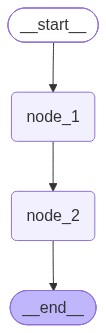
# 图结构可视化
graph TD; | |
__start__([<p>__start__</p>]):::first | |
node_1(node_1) | |
node_2(node_2) | |
__end__([<p>__end__</p>]):::last | |
__start__ --> node_1; | |
node_1 --> node_2; | |
node_2 --> __end__; | |
classDef default fill:#f2f0ff,line-height:1.2 | |
classDef first fill-opacity:0 | |
classDef last fill:#bfb6fc |
# 顺嘴一提 Python 的小知识
py 中存在一个、两个、四个短线的名字,那么那些分别是什么东西呢?
xxxx:公开属性,外部可以自由访问_xxxx:受保护的属性,约定不要外部直接访问,但是不做直接强制__xxxx:私有属性,Python 会自动改写名称(_类名__xxxx),防止外部访问__xxxx__:魔法属性,比如__init__,是 Python 的内置特殊属性,不要随意定义这类名
魔法属性:它们不是让你直接调用的,而是由 Python 解释器在特定场景下自动触发的。你可以把它们理解为 Python 对象的 "钩子"(hooks),让你能自定义对象在各种内置操作中的行为。
# 三种图的输出模式
from typing import TypedDict | |
from langgraph.graph import StateGraph, START, END | |
class HelloState(TypedDict): | |
name: str | |
greeting: str | |
def greet(helloState: HelloState) -> dict: | |
name = helloState["name"] | |
return {"greeting": f"Hello, {name}!"} | |
def add_emoji(helloState: HelloState) -> dict: | |
greeting = helloState["greeting"] | |
return {"greeting": greeting + '...smile√(!_!)√'} | |
graph = StateGraph(HelloState) | |
graph.add_node("greet", greet) | |
graph.add_node("add_emoji", add_emoji) | |
graph.add_edge(START, "greet") | |
graph.add_edge("greet", "add_emoji") | |
graph.add_edge("add_emoji", END) | |
app = graph.compile() | |
result = app.invoke({"name": "Karry"}) | |
print(result) | |
print() | |
app.get_graph().print_ascii() | |
print() | |
print(app.get_graph().draw_mermaid()) | |
png_bytes = app.get_graph().draw_mermaid_png( | |
max_retries=2, | |
retry_delay=2.0 | |
) | |
output_path = "langgraph" + str(uuid.uuid4())[:8] + ".png" | |
with open(output_path, "wb") as f: | |
f.write(png_bytes) | |
print(f"Mermaid graph saved to {output_path}") |
graph TD; | |
__start__([<p>__start__</p>]):::first | |
greet(greet) | |
add_emoji(add_emoji) | |
__end__([<p>__end__</p>]):::last | |
__start__ --> greet; | |
greet --> add_emoji; | |
add_emoji --> __end__; | |
classDef default fill:#f2f0ff,line-height:1.2 | |
classDef first fill-opacity:0 | |
classDef last fill:#bfb6fc |
# 官网对此的定义
To emphasize: Nodes and Edges are nothing more than functions—they can contain an LLM or just good ol’ code.
需要强调的是: Nodes 和 Edges 本质上只是一些函数而已 —— 它们可以包含大型语言模型,也可以只是普通的代码。
事实上,就是这样,它可以是一些基础的函数,比如加减乘除,那么他就可以是更复杂的东西,比如调用数据库,那么更可以是调用大模型。
# 图间流动本质上就是传 HashMap
在图中一般会定义一个:
class HelloState(TypedDict): | |
name: str | |
greeting: str |
而这个本质上就是一个 HashMap,因此我们可以直接传递一个隐式的 Map,形如:
from langgraph.graph import StateGraph, START, END | |
def add_func(state): | |
print(f"初始值:{state}") | |
return {"x": state["x"] + 1} | |
def multiply_func(state): | |
print(f"初始值:{state}") | |
return {"x": state["x"] * 2} | |
graph = StateGraph(dict) | |
graph.add_node("add", add_func) | |
graph.add_node("multiply", multiply_func) | |
# graph.add_edge(START, "add") | |
# graph.add_edge("add", "multiply") | |
# graph.add_edge("multiply", END) | |
( | |
graph.add_edge(START, "add") | |
.add_edge("add", "multiply") | |
.add_edge("multiply", END) | |
) | |
app = graph.compile() | |
app.get_graph().print_ascii() | |
print(app.invoke({"x": 10})) |
本质上依然是 HashMap,也就是那种字典。
# Annotated 增强工具
Annotated 是 Python 的 typing 模块中一个非常强大的工具,它的核心作用是给类型提示附加额外的元数据。
# Annotated 的语法
Annotated[类型, 元数据1, 元数据2, ...] |
第一个数据是他的真实类型,后面的任意数量的额外元数据,可以是函数、类、配置字典等。
# 现在让我们加上 LLM
import os | |
from typing import TypedDict, Annotated, List | |
from dotenv import load_dotenv | |
from langchain.chat_models import init_chat_model | |
from langchain_core.messages import HumanMessage | |
from langgraph.constants import START, END | |
from langgraph.graph import add_messages, StateGraph | |
class AtguiguState(TypedDict): | |
messages: Annotated[List, add_messages] | |
load_dotenv(override=True) | |
llm_deepseek = init_chat_model( | |
model="deepseek:deepseek-v4-flash", | |
api_base=os.getenv("DEEPSEEK_BASE_URL"), | |
api_key=os.getenv("DEEPSEEK_API_KEY") | |
) | |
def hello_agent_node(state: AtguiguState): | |
reply = llm_deepseek.invoke(state["messages"]) | |
return {"messages": [reply]} | |
graph = StateGraph(AtguiguState) | |
graph.add_node("hello_agent", hello_agent_node) | |
( | |
graph.add_edge(START, "hello_agent") | |
.add_edge("hello_agent", END) | |
) | |
app = graph.compile() | |
result = app.invoke({"messages": [HumanMessage(content="你好,你是谁!")]}) | |
print(result["messages"][-1].content) |
其中, result["messages"] 是 py 中字典的访问方式。
# 利用 LangGraph 建立图的一般步骤
- 创建一个 State 状态
- 定义节点
- 添加节点与建立边
- 编译图
- 执行工作流
那么节点可以是” 加减乘除 “,那就可以是调用 LLM 进行对话,那么就可以通过节点调用数据库,访问微服务,当你意识到这一点的时候,那就完全不一样了。
# 状态更新
# 默认行为 —— 覆盖更新策略
from typing import TypedDict, List | |
from langgraph.constants import START, END | |
from langgraph.graph import StateGraph | |
class DefaultReducerState(TypedDict): | |
inner_number: list | |
msg: List[int] | |
def node_1(state: DefaultReducerState): | |
print("node_1: ", state) | |
return {"inner_number": state["inner_number"] + 1, "msg": ["world"]} | |
graph = StateGraph(DefaultReducerState) | |
graph.add_node("node_1", node_1) | |
graph.add_edge(START, "node_1").add_edge("node_1", END) | |
app = graph.compile() | |
print(app.invoke({"inner_number": 123, "msg": ['hello']})) |
状态的默认行为就是直接替换,和普通变量一样。
node_1:
# 追加策略 —— 适用于消息上下文(add_messages)
from typing import TypedDict, Annotated, List | |
from langchain_core.messages import AIMessage | |
from langgraph.constants import START, END | |
from langgraph.graph import add_messages, StateGraph | |
class add_messages_state(TypedDict): | |
inner_number: int | |
msg: Annotated[List, add_messages] | |
def node_1(state: add_messages_state): | |
print("node_1: ", state) | |
return {"inner_number": state["inner_number"] + 1, "msg": [AIMessage("world")]} | |
graph = StateGraph(add_messages_state) | |
graph.add_node("node_1", node_1) | |
graph.add_edge(START, "node_1").add_edge("node_1", END) | |
app = graph.compile() | |
print(app.invoke({"inner_number": 0, "msg": ["hello"]})) |
输出:
node_1: {'inner_number': 0, 'msg': [HumanMessage(content='hello', additional_kwargs={}, response_metadata={}, id='6251a19e-fa2f-47fd-8f6a-ea46287e9aef')]} | |
{'inner_number': 1, 'msg': [HumanMessage(content='hello', additional_kwargs={}, response_metadata={}, id='6251a19e-fa2f-47fd-8f6a-ea46287e9aef'), AIMessage(content='world', additional_kwargs={}, response_metadata={}, id='83cf3697-6224-4cc0-9c01-740e7099eb76', tool_calls=[], invalid_tool_calls=[])]} |
观察输出,这里第二次消息多了一个 AIMsg,是追加的不是和上一次一样的替换掉了。
# operator.add 策略
这个针对不同的数据类型有着不同的表现形式,下面是列表:
import operator | |
from typing import TypedDict, Annotated, List | |
from langchain_core.messages import AIMessage | |
from langgraph.constants import START, END | |
from langgraph.graph import add_messages, StateGraph | |
class add_messages_state(TypedDict): | |
inner_number: int | |
msg: Annotated[List, operator.add] | |
def node_1(state: add_messages_state): | |
print("node_1: ", state) | |
return {"inner_number": state["inner_number"] + 1, "msg": ["world"]} | |
graph = StateGraph(add_messages_state) | |
graph.add_node("node_1", node_1) | |
graph.add_edge(START, "node_1").add_edge("node_1", END) | |
app = graph.compile() | |
print(app.invoke({"inner_number": 0, "msg": ["hello"]})) |
输出:
node_1: {'inner_number': 0, 'msg': ['hello']} | |
{'inner_number': 1, 'msg': ['hello', 'world']} |
这里表现为追加,注意和 add_messages 的区别是,如果是字符串的话 add_messages 会先封装一次消息,默认封装为用户消息,这个不会封装。
下面是字符串类型,表现为拼接式的追加:
import operator | |
from typing import TypedDict, Annotated, List | |
from langchain_core.messages import AIMessage | |
from langgraph.constants import START, END | |
from langgraph.graph import add_messages, StateGraph | |
class add_messages_state(TypedDict): | |
inner_number: int | |
msg: Annotated[List, operator.add] | |
sp_str: Annotated[str, operator.add] | |
def node_1(state: add_messages_state): | |
print("node_1: ", state) | |
return {"inner_number": state["inner_number"] + 1, "msg": ["world"], "sp_str": " 我拼接上了呦"} | |
graph = StateGraph(add_messages_state) | |
graph.add_node("node_1", node_1) | |
graph.add_edge(START, "node_1").add_edge("node_1", END) | |
app = graph.compile() | |
print(app.invoke({"inner_number": 0, "msg": ["hello"], "sp_str": " 我是原来的字符串"})) |
下面是输出:
node_1: {'inner_number': 0, 'msg': ['hello'], 'sp_str': ' 我是原来的字符串'} | |
{'inner_number': 1, 'msg': ['hello', 'world'], 'sp_str': ' 我是原来的字符串 我拼接上了呦'} |
下面是数据类型,表现为加法:
import operator | |
from typing import TypedDict, Annotated, List | |
from langchain_core.messages import AIMessage | |
from langgraph.constants import START, END | |
from langgraph.graph import add_messages, StateGraph | |
class add_messages_state(TypedDict): | |
inner_number: int | |
msg: Annotated[List, operator.add] | |
sp_str: Annotated[str, operator.add] | |
sp_number: Annotated[int, operator.add] | |
def node_1(state: add_messages_state): | |
print("node_1: ", state) | |
return { | |
"inner_number": state["inner_number"] + 1, | |
"msg": ["world"], | |
"sp_str": " 我拼接上了呦", | |
"sp_number": 100 | |
} | |
graph = StateGraph(add_messages_state) | |
graph.add_node("node_1", node_1) | |
( | |
graph.add_edge(START, "node_1") | |
.add_edge("node_1", END) | |
) | |
app = graph.compile() | |
print(app.invoke({ | |
"inner_number": 0, | |
"msg": ["hello"], | |
"sp_str": " 我是原来的字符串", | |
"sp_number": 12 | |
})) |
结果:
node_1: {'inner_number': 0, 'msg': ['hello'], 'sp_str': ' 我是原来的字符串', 'sp_number': 12} | |
{'inner_number': 1, 'msg': ['hello', 'world'], 'sp_str': ' 我是原来的字符串 我拼接上了呦', 'sp_number': 112} |
# operator.mul 策略
实际上这个策略有问题,如果大家以为和上面一样就错了。什么难道不是直接乘一下嘛?好下面我给你演示一下:
import operator | |
from typing import TypedDict, Annotated, List | |
from langchain_core.messages import AIMessage | |
from langgraph.constants import START, END | |
from langgraph.graph import add_messages, StateGraph | |
class add_messages_state(TypedDict): | |
inner_number: int | |
msg: Annotated[List, operator.add] | |
sp_str: Annotated[str, operator.add] | |
sp_number: Annotated[int, operator.add] | |
mp_number: Annotated[int, operator.mul] | |
def node_1(state: add_messages_state): | |
print("node_1: ", state) | |
return { | |
"inner_number": state["inner_number"] + 1, | |
"msg": ["world"], | |
"sp_str": " 我拼接上了呦", | |
"sp_number": 100, | |
"mp_number": 2 | |
} | |
graph = StateGraph(add_messages_state) | |
graph.add_node("node_1", node_1) | |
( | |
graph.add_edge(START, "node_1") | |
.add_edge("node_1", END) | |
) | |
app = graph.compile() | |
print(app.invoke({ | |
"inner_number": 0, | |
"msg": ["hello"], | |
"sp_str": " 我是原来的字符串", | |
"sp_number": 12, | |
"mp_number": 3 | |
})) |
输出是这样的:
node_1: {'inner_number': 0, 'msg': ['hello'], 'sp_str': ' 我是原来的字符串', 'sp_number': 12, 'mp_number': 0} | |
{'inner_number': 1, 'msg': ['hello', 'world'], 'sp_str': ' 我是原来的字符串 我拼接上了呦', 'sp_number': 112, 'mp_number': 0} |
实际上你可以看到,默认是 0,他先会乘一个默认值,因此无论乘什么都是 0 了。
# 通过自定义 Reducer 解决 operator.mul 策略问题
自定义 Reducer 大致步骤
# 自定义 Reducer
def my_mul_reducer(current_value: float, new_value: float) -> float: | |
if current_value == 0.0: | |
return new_value * 1.0 | |
return current_value * new_value |
# 通过 Annotated 加载
class add_messages_state(TypedDict): | |
inner_number: int | |
msg: Annotated[List, operator.add] | |
sp_str: Annotated[str, operator.add] | |
sp_number: Annotated[int, operator.add] | |
mp_number: Annotated[int, operator.mul] | |
mp_my_number: Annotated[float, my_mul_reducer] |
# 节点超方法
# 节点缓存
同一个业务,反复请求,但是结果却是一样的,我们可以把他们做一个节点缓存,在这里有两个参数,分别是 keyFunc 用于根据节点的输入生成缓存键和 ttl 是缓存缓存的生存时间。
# _*_ coding : utf-8 _*_ | |
# @Time : 2026/8/28 14:35 | |
# @Author : KarryLiu | |
# File : s_node | |
# @Project : lg-stu | |
from time import sleep, time | |
from typing import Annotated, List, TypedDict | |
from langgraph.cache.memory import InMemoryCache | |
from langgraph.constants import START, END | |
from langgraph.graph import add_messages, StateGraph | |
from langgraph.types import CachePolicy | |
class my_node(TypedDict): | |
inner_number: int | |
builder = StateGraph(my_node) | |
def expensive_node(state: my_node): | |
sleep(3) | |
print("expensive_node: ", state) | |
return {"inner_number": state["inner_number"] + 1} | |
builder.add_node( | |
"expensive_node", expensive_node, | |
cache_policy=CachePolicy(ttl=8) | |
) | |
( | |
builder.add_edge(START, "expensive_node") | |
.add_edge("expensive_node", END) | |
) | |
app = builder.compile(cache=InMemoryCache()) | |
print("第一次调用,应该会慢一些,因为需要执行节点函数") | |
# 开始计时 | |
start_time = time() | |
app.invoke({"inner_number": 0}) | |
print(f"第一次调用耗时: {time() - start_time:.2f} 秒") | |
print("第二次调用,应该会快一些,因为使用了缓存") | |
start_time = time() | |
app.invoke({"inner_number": 0}) | |
print(f"第二次调用耗时: {time() - start_time:.2f} 秒") | |
sleep(9) # 等待缓存过期 | |
print("第三次调用,应该会慢一些,因为缓存已经过期,需要重新执行节点函数") | |
start_time = time() | |
app.invoke({"inner_number": 0}) | |
print(f"第三次调用耗时: {time() - start_time:.2f} 秒") |
缓存生效:
第一次调用,应该会慢一些,因为需要执行节点函数 | |
expensive_node: {'inner_number': 0} | |
第一次调用耗时: 3.01 秒 | |
第二次调用,应该会快一些,因为使用了缓存 | |
第二次调用耗时: 0.01 秒 | |
第三次调用,应该会慢一些,因为缓存已经过期,需要重新执行节点函数 | |
expensive_node: {'inner_number': 0} | |
第三次调用耗时: 3.01 秒 | |
Disconnected from server |
# 节点重试
和缓存一样,都是再节点定义的时候附加上这个参数。
# 默认重试机制
default_graph = build_retry_graph( | |
node_name="unstable_api", | |
node_func=unstable_api_call, | |
retry_policy=RetryPolicy(max_attempts=5) # 最多 5 次尝试,足够重试成功 | |
) |
# 自定义重试机制
custom_graph = build_retry_graph( | |
node_name="custom_retry_api", | |
node_func=unstable_api_call, | |
retry_policy=RetryPolicy(max_attempts=5, retry_on=custom_retry_on) | |
) |
通过 retry_on 指定自定义内容:
# 自定义重试条件判断函数 | |
def custom_retry_on(exception: Exception) -> bool: | |
"""自定义重试规则:只对包含「模拟API调用失败」的异常重试""" | |
print("########################: "+str(exception)) | |
err_msg = str(exception) | |
if "模拟API调用失败" in err_msg: | |
print(f"捕获到可重试异常: {err_msg}") | |
return True | |
print(f"捕获到不可重试异常: {err_msg}") | |
return False |
# 不会重试的类型
ValueError, TypeError, ArithmeticError, ImportError, LookupError, NameError, SyntaxError, RuntimeError, ReferenceError, StopIteration, StopAsyncIteration, OSError
以上类型不会被重试。
# 边
决定节点数据如何流向的称之为边,边分为:
- 普通边
- 条件边
- 入口点
- 条件入口点
# 普通边
直接链接两个节点的边,就是普通边,我们之前用到所有边都是普通边。
# 条件边
条件边,是最常用的边,相当于一个路由选择器。
from typing import TypedDict, Optional | |
from langgraph.constants import START, END | |
from langgraph.graph import StateGraph | |
from logger import logger | |
class AgentState(TypedDict): | |
inner_number: int | |
result: Optional[str] = None | |
def check_x(state: AgentState): | |
logger.info(f"[check_x] Received state: {state}") | |
return state | |
def is_even(state: AgentState): | |
logger.info(f"[is_even] Received state: {state}") | |
return state["inner_number"] % 2 == 0 | |
def handle_even(state: AgentState): | |
logger.info(f"[handle_even] Received state: {state}") | |
return state.update({"result": "Even number processed"}) | |
def handle_odd(state: AgentState): | |
logger.info(f"[handle_odd] Received state: {state}") | |
return state.update({"result": "Odd number processed"}) | |
builder = StateGraph(AgentState) | |
builder.add_node("check_x", check_x) | |
builder.add_node("is_even", is_even) | |
builder.add_node("handle_even", handle_even) | |
builder.add_node("handle_odd", handle_odd) | |
( | |
builder.add_edge(START, "check_x") | |
.add_conditional_edges( | |
"check_x", | |
is_even, { | |
True: "handle_even", | |
False: "handle_odd" | |
} | |
) | |
.add_edge("handle_even", END) | |
.add_edge("handle_odd", END) | |
) | |
app = builder.compile() | |
print(app.get_graph().print_ascii()) | |
print(app.invoke({"inner_number": 4})) |
这就是条件边,主要使用条件边构造器 add_conditional_edges 来实现不同节点的路由:
.add_conditional_edges( | |
"check_x", | |
is_even, { | |
True: "handle_even", | |
False: "handle_odd" | |
} | |
) |
# 一对多条件
from typing import TypedDict | |
from langgraph.constants import START, END | |
from langgraph.graph import StateGraph | |
class AgentState(TypedDict): | |
inner_number: int | |
def node_add_1(state: AgentState): | |
print("node_add_1: ", state) | |
return {"inner_number": state["inner_number"] + 1} | |
def node_add_2(state: AgentState): | |
print("node_add_2: ", state) | |
return {"inner_number": state["inner_number"] + 2} | |
def node_add_3(state: AgentState): | |
print("node_add_3: ", state) | |
return {"inner_number": state["inner_number"] + 3} | |
def node_router(state: AgentState) -> str: | |
flag = state["inner_number"] | |
if flag == 1: | |
return "node_add_1" | |
elif flag == 2: | |
return "node_add_2" | |
else: | |
return "node_add_3" | |
builder = StateGraph(AgentState) | |
builder.add_node("node_add_1", node_add_1) | |
builder.add_node("node_add_2", node_add_2) | |
builder.add_node("node_add_3", node_add_3) | |
( | |
builder.add_conditional_edges(START, node_router, { | |
"node_add_1": "node_add_1", | |
"node_add_2": "node_add_2", | |
"node_add_3": "node_add_3" | |
}) | |
.add_edge("node_add_1", END) | |
.add_edge("node_add_2", END) | |
.add_edge("node_add_3", END) | |
) | |
app = builder.compile() | |
app.invoke({"inner_number": 1}) |
注意: node_router 不是一个普通的节点,因此,不能通过 add_node 方法将其添加为普通节点。
# 入口点
入口点实际上就是一个占位符,其实我们早已就已经接触过了,就是位于 add_edge 这个中的 START 占位符,这个是系统认为的开始点,实际上在业务上,是在占位符后面那第一个节点。
# 条件入口点
正常来说,START 后通常只有一个紧邻的节点,就像这样:
graph TD; | |
__start__([<p>__start__</p>]):::first | |
node_1(node_1) | |
node_2(node_2) | |
__end__([<p>__end__</p>]):::last | |
__start__ --> node_1; | |
node_1 --> node_2; | |
node_2 --> __end__; | |
classDef default fill:#f2f0ff,line-height:1.2 | |
classDef first fill-opacity:0 | |
classDef last fill:#bfb6fc |
但是条件入口是这样的:
graph TD; | |
__start__([<p>__start__</p>]):::first | |
node_1(node_1) | |
node_2(node_2) | |
__end__([<p>__end__</p>]):::last | |
__start__ --> node_1; | |
__start__ --> node_2; | |
node_2 --> __end__; | |
node_1 --> __end__; | |
classDef default fill:#f2f0ff,line-height:1.2 | |
classDef first fill-opacity:0 | |
classDef last fill:#bfb6fc |
条件入口可以有多种进入 Graph 的路径,这就是可以根据不同的条件,选进我们可以进入的点。这种的条件入口,代码就像这样:
from typing import TypedDict | |
from langgraph.constants import START | |
from langgraph.graph import StateGraph | |
class SimpleState(TypedDict): | |
user_input: str | |
response: str | |
node_visited: str | |
def handle_greeting(state: SimpleState) -> SimpleState: | |
"""处理问候""" | |
state["response"] = "你好!很高兴见到你!" | |
state["node_visited"] = "greeting_node" | |
return state | |
def handle_farewell(state: SimpleState) -> SimpleState: | |
"""处理告别""" | |
state["response"] = "再见!祝你有美好的一天!" | |
state["node_visited"] = "farewell_node" | |
return state | |
def handle_question(state: SimpleState) -> SimpleState: | |
"""处理问题""" | |
state["response"] = "我听到了你的问题,需要更多帮助吗?" | |
state["node_visited"] = "question_node" | |
return state | |
def route_input(state: SimpleState) -> str: | |
user_input = state["user_input"] | |
if "你好" in user_input: | |
return "greeting_node" | |
elif "再见" in user_input: | |
return "farewell_node" | |
else: | |
return "question_node" | |
builder = StateGraph(SimpleState) | |
builder.add_node("greeting_node", handle_greeting) | |
builder.add_node("farewell_node", handle_farewell) | |
builder.add_node("question_node", handle_question) | |
( | |
builder.add_conditional_edges( | |
START, | |
route_input,{ | |
"greeting_node": "greeting_node", | |
"farewell_node": "farewell_node", | |
"question_node": "question_node" | |
} | |
) | |
) | |
app = builder.compile() | |
print(app.invoke({"user_input": "你是谁?"})) |
# 真的是条件入口嘛?实际上是基于条件边
我认为这个条件入口仅仅是一个概念,而真正发挥作用的是条件边:
add_conditional_edges 直接决定了后续数据如何流动。
# Send
graph TD; | |
__start__(<p>__start__</p>) | |
generate_subjects(generate_subjects) | |
make_joke(make_joke) | |
__end__(<p>__end__</p>) | |
__start__ --> generate_subjects; | |
generate_subjects --> __end__; | |
classDef default fill:#f2f0ff,line-height:1.2 | |
classDef first fill-opacity:0 | |
classDef last fill:#bfb6fc |
Send 有点像广播,但是和真正的广播不一样,是在做拆分子任务分别处理,然后合并在一起做处理。
def generate_subjects(state: AtguiguState) -> dict: | |
"""生成需要处理的主题列表""" | |
print("执行节点(第一个节点:生成需要处理的主题列表): generate_subjects") | |
subjects = ["猫", "狗", "程序员"] | |
print(f"生成主题列表: {subjects}") | |
return {"subjects": subjects} |
依然是基于条件边函数:
# 条件边函数:根据主题列表生成 Send 对象列表 | |
def map_subjects_to_jokes(state: AtguiguState) -> List[Send]: | |
"""将主题列表映射到joke生成任务""" | |
print("执行条件边函数: map_subjects_to_jokes") | |
subjects = state["subjects"] | |
print(f"映射主题到joke任务: {subjects}") | |
# 为每个主题创建一个 Send 对象,指向 make_joke 节点 | |
# 每个 Send 对象包含节点名称和传递给该节点的状态 | |
send_list = [Send("make_joke", {"subject": subject}) for subject in subjects] | |
print(f"生成Send对象列表: {send_list}") | |
return send_list |
通过:
send_list = [Send("make_joke", {"subject": subject}) for subject in subjects] |
拆分成多个子任务。
可以看到这里,并没有任何一个节点连接至 make_joke
builder = StateGraph(AtguiguState) | |
# 添加节点 | |
builder.add_node("generate_subjects", generate_subjects) | |
builder.add_node("make_joke", make_joke) | |
# 添加边 | |
builder.add_edge(START, "generate_subjects") | |
# 添加条件边,使用 Send 对象实现 map-reduce | |
builder.add_conditional_edges( | |
"generate_subjects", # 源节点 | |
map_subjects_to_jokes # 路由函数,返回 Send 对象列表 | |
) | |
# 从 make_joke 到结束 | |
builder.add_edge("make_joke", END) | |
# 编译图 | |
graph = builder.compile() | |
print(graph.get_graph().draw_mermaid()) |
那是谁执行了万箭齐发的动作?
send_list = [Send("make_joke", {"subject": subject}) for subject in subjects] | |
print(f"生成Send对象列表: {send_list}") | |
return send_list |
注意这里返回的是 Send 对象,这里直接执行了节点的连接。
注意! map_subjects_to_jokes 返回的是 Send 列表对象。
# Command
Command 有点像 Send,但是 Send 是在发送一些东西,然后让许多个 Send 对象进行同步执行,这里最重要的就是同步执行,而 Commend 讲的是,我们这里有一个公共状态: AgentState ,主要是通过: decision_agent 这代理反复判断其状态,那么在这里实际上就是去判断 last_msg_content 和 task_completed ,这两个具体来进行如何执行。
当 last_msg_content 中有指定关键字的时候,那么就对相应的节点发起 Command,命令其进行开始执行,如果 last_msg_content 中没有相应关键字或者 task_completed 为真的时候,那么就结束执行,每次发起 Commend 进入节点执行完毕的时候,又会通过图的流程返回 decision_agent ,非常的精妙。
# _*_ coding : utf-8 _*_ | |
# @Time : 2026/9/7 14:50 | |
# @Author : KarryLiu | |
# File : commend_stu | |
# @Project : lg-stu | |
from typing import Annotated | |
from typing_extensions import TypedDict | |
from langgraph.graph import StateGraph, START, END | |
from langgraph.types import Command | |
# 全局常量:统一递归限制,便于维护 | |
RECURSION_LIMIT = 50 | |
# 定义状态 | |
class AgentState(TypedDict): | |
messages: Annotated[list, lambda x, y: x + y] # 自动合并消息 | |
current_agent: str | |
task_completed: bool | |
def decision_agent(state: AgentState) -> Command[AgentState]: | |
"""根据消息内容路由代理,任务完成则直接终止""" | |
print("执行节点: decision_agent") | |
# 优先终止流程(核心防循环逻辑) | |
if state["task_completed"]: | |
print("✅ 检测到任务已完成,直接终止流程") | |
return Command( | |
update={"messages": [("system", "所有任务处理完成,流程正常结束")]}, | |
goto=END | |
) | |
# 提取消息文本(兼容空消息) | |
last_message = state["messages"][-1] if state["messages"] else ("", "") | |
last_msg_content = last_message[1] | |
print(f"最新消息文本: {last_msg_content}") | |
# 动态路由 | |
if "数学" in last_msg_content: | |
print("✅ 检测到数学任务,路由到数学代理") | |
return Command( | |
update={"messages": [("system", "路由到数学代理")], "current_agent": "math_agent"}, | |
goto="math_agent" | |
) | |
elif "翻译" in last_msg_content: | |
print("✅ 检测到翻译任务,路由到翻译代理") | |
return Command( | |
update={"messages": [("system", "路由到翻译代理")], "current_agent": "translation_agent"}, | |
goto="translation_agent" | |
) | |
else: | |
print("❌ 未识别任务类型,标记任务完成并终止") | |
return Command( | |
update={"messages": [("system", "任务完成")], "task_completed": True}, | |
goto=END | |
) | |
# 数学代理(业务节点) | |
def math_agent(state: AgentState) -> Command[AgentState]: | |
"""处理数学计算任务,完成后返回决策代理""" | |
print("执行节点: math_agent") | |
result = "2 + 2 = 4" | |
print(f"计算结果: {result}") | |
return Command( | |
update={ | |
"messages": [("assistant", f"数学计算结果: {result}")], | |
"current_agent": "decision_agent", | |
"task_completed": True | |
}, | |
goto="decision_agent" | |
) | |
# 翻译代理(业务节点) | |
def translation_agent(state: AgentState) -> Command[AgentState]: | |
"""处理中英翻译任务,完成后返回决策代理""" | |
print("执行节点: translation_agent") | |
translation = "Hello -> 你好" | |
print(f"翻译结果: {translation}") | |
return Command( | |
update={ | |
"messages": [("assistant", f"翻译结果: {translation}")], | |
"current_agent": "decision_agent", | |
"task_completed": True | |
}, | |
goto="decision_agent" | |
) | |
def main(): | |
"""演示Command基础用法:状态更新+动态路由+流程终止""" | |
print("=== Command 基础演示(LangGraph 1.0.6)===\n") | |
# 1. 构建状态图 | |
builder = StateGraph(AgentState) | |
builder.add_node("decision_agent", decision_agent) | |
builder.add_node("math_agent", math_agent) | |
builder.add_node("translation_agent", translation_agent) | |
# 2. 定义边(完整节点关系) | |
builder.add_edge(START, "decision_agent") | |
builder.add_edge("math_agent", "decision_agent") | |
builder.add_edge("translation_agent", "decision_agent") | |
builder.add_edge("decision_agent", END) | |
# 3. 编译图 | |
graph = builder.compile() | |
# 测试 1:数学任务 | |
print("【测试1: 数学任务】") | |
initial_state = {"messages": [("user", "我需要计算数学题")], "current_agent": "user", "task_completed": False} | |
print("初始状态:", initial_state) | |
result = graph.invoke(initial_state, recursion_limit=RECURSION_LIMIT) | |
print("最终状态(简化):", {k: v for k, v in result.items() if k != "messages"}) # 简化输出 | |
print("\n" + "-" * 50 + "\n") | |
# 测试 2:翻译任务 | |
print("【测试2: 翻译任务】") | |
initial_state = {"messages": [("user", "我需要翻译文本")], "current_agent": "user", "task_completed": False} | |
print("初始状态:", initial_state) | |
result = graph.invoke(initial_state, recursion_limit=RECURSION_LIMIT) | |
print("最终状态(简化):", {k: v for k, v in result.items() if k != "messages"}) | |
print("\n" + "-" * 50 + "\n") | |
# 测试 3:未识别任务 | |
print("【测试3: 未识别任务类型】") | |
initial_state = {"messages": [("user", "你好")], "current_agent": "user", "task_completed": False} | |
print("初始状态:", initial_state) | |
result = graph.invoke(initial_state, recursion_limit=RECURSION_LIMIT) | |
print("最终状态(简化):", {k: v for k, v in result.items() if k != "messages"}) | |
# 新增:可视化图结构(教学演示必备) | |
print("\n=== 图结构可视化 ===") | |
print(graph.get_graph().draw_mermaid()) | |
if __name__ == "__main__": | |
main() |
原版输出是这样的:
graph TD; | |
__start__(<p>__start__</p>) | |
decision_agent(decision_agent) | |
math_agent(math_agent) | |
translation_agent(translation_agent) | |
__end__(<p>__end__</p>) | |
__start__ --> decision_agent; | |
decision_agent --> __end__; | |
classDef default fill:#f2f0ff,line-height:1.2 | |
classDef first fill-opacity:0 | |
classDef last fill:#bfb6fc |
但是根据图的定义,我觉得应该是这样的:
graph TD; | |
__start__(<p>__start__</p>) | |
decision_agent(decision_agent) | |
math_agent(math_agent) | |
translation_agent(translation_agent) | |
__end__(<p>__end__</p>) | |
__start__ --> decision_agent; | |
translation_agent --> decision_agent; | |
math_agent --> decision_agent; | |
decision_agent --> __end__; | |
classDef default fill:#f2f0ff,line-height:1.2 | |
classDef first fill-opacity:0 | |
classDef last fill:#bfb6fc |
# 运行时上下文
from langchain.agents import AgentState | |
from langgraph.constants import START, END | |
from langgraph.graph import StateGraph | |
from langgraph.runtime import Runtime | |
from pydantic.dataclasses import dataclass | |
class AgentState(AgentState): | |
inner_number: int | |
msg: str | |
@dataclass | |
class ContextSchema: | |
model_name: str = "gpt-3.5-turbo" | |
model_max_tokens: int = 1024 | |
# 定义节点 | |
def node_1(state: AgentState, runtime: Runtime[ContextSchema]) -> dict: | |
inner_model_name = runtime.context.model_name | |
print("node_1 use model_name: ", inner_model_name) | |
return {"inner_number": state["inner_number"] + 1, "msg": "used model_name: " + inner_model_name} | |
if __name__ == '__main__': | |
context = ContextSchema(model_name="gpt-4", model_max_tokens=2048) | |
graph = StateGraph(AgentState, context_schema=ContextSchema) | |
graph.add_node("node_1", node_1) | |
( | |
graph.add_edge(START, "node_1") | |
.add_edge("node_1", END) | |
) | |
app = graph.compile() | |
app.invoke({"inner_number": 0, "msg": "hello"}, context=context) |
这个 Context 相当于 Java 项目的 yml,这个主要做的是配置与代码分离。
# py 的基类
class my_class: | |
pass | |
print(my_class.__bases__) |
是小写的 object
# @dataclass
写了这么长时间,我们在类中通常使用双杠 init 来初始化类,但是从现在开始,我将推荐使用 @dataclass。
本质上就是:** 帮你自动生成 __init__ ,同时 Pydantic 会根据类型注解做校验和转换。** 还有就是 eq 方法等,都帮你重写了。
from pydantic.dataclasses import dataclass | |
@dataclass | |
class MyClass: | |
name: str | |
age: int | |
def __post_init__(self): | |
if not isinstance(self.age, int): | |
raise ValueError("Age must be an integer") | |
if self.age < 0: | |
raise ValueError("Age cannot be negative") | |
user = MyClass( | |
name="Karry", | |
age=-9 | |
) | |
print(user.age) | |
print(type(user.age)) | |
print(user) |
一般一些值检查通过 __post_init__ 实现。
# 高级特性
# 流图状态
from typing import TypedDict | |
from langgraph.graph import StateGraph, START, END | |
class AtguiguState(TypedDict): | |
topic: str | |
joke: str | |
def refine_topic(state: AtguiguState): | |
return {"topic": state["topic"] + " and cats"} | |
def generate_joke(state: AtguiguState): | |
return {"joke": f"This is a joke about {state['topic']}"} | |
def main(): | |
graph = ( | |
StateGraph(AtguiguState) | |
.add_node(refine_topic) | |
.add_node(generate_joke) | |
.add_edge(START, "refine_topic") | |
.add_edge("refine_topic", "generate_joke") | |
.add_edge("generate_joke", END) | |
.compile() | |
) | |
# updates 在图的每一步后,将更新流向状态。 | |
for chunk in graph.stream({"topic": "ice cream"},stream_mode="updates"): | |
print(chunk) | |
print() | |
# values 在图的每一步后,流出状态的全部值。 | |
for chunk in graph.stream({"topic": "ice cream"},stream_mode="values"): | |
print(chunk) | |
if __name__ == "__main__": | |
main() |
其中 stream_mode="updates" 讲的的每一步改了什么,只输出改的那部分,
而 stream_mode="values" 讲的是这一步之后我的状态整体是是什么样子的,当然他们都是流式输出,结果都是输出状态。
推荐的调试方法:使用 updates 和 values 的混合模式。
print("--- 3. 同时使用stream_mode=[values,updates]多种流模式 ---") | |
print("同时显示完整状态和状态更新:") | |
for mode, chunk in graph.stream(input_state, stream_mode=["values", "updates"]): | |
print(f" [{mode}]: {chunk}") |
# 在节点中调用 LLM 进行流式输出
import os | |
from typing import TypedDict | |
from dotenv import load_dotenv | |
from langchain.chat_models import init_chat_model | |
from langgraph.constants import START | |
from langgraph.graph import StateGraph | |
class AgentState(TypedDict): | |
query: str | |
answer: str | |
load_dotenv(override=True) | |
def node_1(state: AgentState): | |
print("node_1: ", state) | |
llm_deepseek = init_chat_model( | |
model="deepseek:deepseek-v4-flash", | |
api_base=os.getenv("DEEPSEEK_BASE_URL"), | |
api_key=os.getenv("DEEPSEEK_API_KEY") | |
) | |
llm_result = llm_deepseek.invoke([{"role": "user", "content": state["query"]}]) | |
print("llm invoked 结束") | |
return {"answer": llm_result} | |
app = ( | |
StateGraph(AgentState) | |
.add_node("node_1", node_1) | |
.add_edge(START, "node_1") | |
.compile() | |
) | |
inputs = {"query": "生成一篇200字的小作文,主题是关于人工智能的未来发展。"} | |
for chunk, mate_data in app.stream(inputs, stream_mode="messages"): | |
print(chunk.content, end="") | |
# print(chunk,end="") |
# 持久化储存
# 内存检查点与状态恢复
import operator | |
from typing import TypedDict, Annotated, List | |
from langgraph.checkpoint.memory import InMemorySaver | |
from langgraph.constants import START, END | |
from langgraph.graph import StateGraph | |
class AgentState(TypedDict): | |
msg: Annotated[List, operator.add] | |
inner_number: int | |
def node_1(state: AgentState): | |
print("node_1: ", state) | |
return {"inner_number": state["inner_number"] + 1, "msg": ["执行了 node 1"]} | |
def node_2(state: AgentState): | |
print("node_2: ", state) | |
return {"inner_number": state["inner_number"] + 1, "msg": ["执行了 node 2"]} | |
def node_3(state: AgentState): | |
print("node_3: ", state) | |
return {"inner_number": state["inner_number"] + 1, "msg": ["执行了 node 3"]} | |
builder = StateGraph(AgentState) | |
( | |
builder.add_node("node_1", node_1) | |
.add_node("node_2", node_2) | |
.add_node("node_3", node_3) | |
.add_edge(START, "node_1") | |
.add_edge("node_1", "node_2") | |
.add_edge("node_2", "node_3") | |
.add_edge("node_3", END) | |
) | |
app = builder.compile(checkpointer=InMemorySaver()) | |
config = { | |
"configurable": { | |
"thread_id": "user_123" | |
} | |
} | |
print(app.invoke({"inner_number": 0, "msg": ["开始执行"]}, config)) | |
# 状态提取 | |
print("-------------------------") | |
print(app.get_state(config)) | |
print("-------------------------") | |
config2 = { | |
"configurable": { | |
"thread_id": "user_1233" | |
} | |
} | |
# 不存在的状态 | |
print("-------------------------") | |
print(app.get_state(config2)) | |
print("-------------------------") | |
print("-------------------------") | |
print(app.invoke(None, config)) | |
print("-------------------------") | |
print("-------------------------") | |
print(type(app.invoke(None, config))) | |
print("-------------------------") |
通过 app.invoke(None, config) 就可以直接恢复。
# 数据库检查点与状态恢复
import operator | |
import sqlite3 | |
from typing import TypedDict, Annotated, List | |
from langgraph.checkpoint.memory import InMemorySaver | |
from langgraph.checkpoint.sqlite import SqliteSaver | |
from langgraph.constants import START, END | |
from langgraph.graph import StateGraph | |
conn = sqlite3.connect(database='E:\\PyCharmCode\\lg-stu\\db\\db.sqlite3', check_same_thread=False) | |
sqlite_db = SqliteSaver(conn) | |
class AgentState(TypedDict): | |
msg: Annotated[List, operator.add] | |
inner_number: int | |
def node_1(state: AgentState): | |
print("node_1: ", state) | |
return {"inner_number": state["inner_number"] + 1, "msg": ["执行了 node 1"]} | |
def node_2(state: AgentState): | |
print("node_2: ", state) | |
return {"inner_number": state["inner_number"] + 1, "msg": ["执行了 node 2"]} | |
def node_3(state: AgentState): | |
print("node_3: ", state) | |
return {"inner_number": state["inner_number"] + 1, "msg": ["执行了 node 3"]} | |
builder = StateGraph(AgentState) | |
( | |
builder.add_node("node_1", node_1) | |
.add_node("node_2", node_2) | |
.add_node("node_3", node_3) | |
.add_edge(START, "node_1") | |
.add_edge("node_1", "node_2") | |
.add_edge("node_2", "node_3") | |
.add_edge("node_3", END) | |
) | |
app = builder.compile(checkpointer=sqlite_db) | |
config = { | |
"configurable": { | |
"thread_id": "user_123" | |
} | |
} | |
print(app.invoke({"inner_number": 0, "msg": ["开始执行"]}, config)) | |
# 状态提取 | |
print("-------------------------") | |
print(app.get_state(config)) | |
print("-------------------------") | |
config2 = { | |
"configurable": { | |
"thread_id": "user_1233" | |
} | |
} | |
# 不存在的状态 | |
print("-------------------------") | |
print(app.get_state(config2)) | |
print("-------------------------") | |
print("-------------------------") | |
print(app.invoke(None, config)) | |
print("-------------------------") | |
print("-------------------------") | |
print(type(app.invoke(None, config))) | |
print("-------------------------") |
# 时间回溯
普通对话是一条路走下去,而时间回溯可以支持你回到某个节点,探索是否还有其他可能的路径。
from typing import TypedDict | |
from langgraph.checkpoint.memory import InMemorySaver | |
from langgraph.constants import START, END | |
from langgraph.graph import StateGraph | |
class AgentState(TypedDict): | |
msg_1: str | |
msg_2: str | |
msg_3: str | |
def node_1(state: AgentState): | |
print("node_1: ", state) | |
return { | |
"msg_1": "我佬1", | |
} | |
def node_2(state: AgentState): | |
print("node_2: ", state) | |
return { | |
"msg_2": "我佬2", | |
} | |
def node_3(state: AgentState): | |
print("node_3: ", state) | |
return { | |
"msg_3": "我佬3", | |
} | |
builder = StateGraph(AgentState) | |
builder.add_node("node_1", node_1) | |
builder.add_node("node_2", node_2) | |
builder.add_node("node_3", node_3) | |
( | |
builder | |
.add_edge(START, "node_1") | |
.add_edge("node_1", "node_2") | |
.add_edge("node_2", "node_3") | |
.add_edge("node_3", END) | |
) | |
app = builder.compile(checkpointer=InMemorySaver()) | |
config = { | |
"configurable": { | |
"thread_id": "user_123" | |
} | |
} | |
print(app.invoke({}, config)) | |
states1 = list(app.get_state_history(config)) | |
for i, state in enumerate(states1): | |
print(f" {i}. 下一步节点: {state.next}") | |
print(f" 检查点ID: {state.config['configurable']['checkpoint_id']}") | |
if state.values: | |
print(f" 状态值: {state.values}") | |
states2 = states1[1] | |
new_config = app.update_state( | |
states2.config, | |
values={"msg_2": "哈哈,被篡改咯~"} | |
) | |
story2 = app.invoke(None, new_config) | |
print("篡改后的状态执行结果: ", story2) |
输出:
Connected to server 127.0.0.1:51366 | |
node_1: {} | |
node_2: {'msg_1': '我佬1'} | |
node_3: {'msg_1': '我佬1', 'msg_2': '我佬2'} | |
{'msg_1': '我佬1', 'msg_2': '我佬2', 'msg_3': '我佬3'} | |
0. 下一步节点: () | |
检查点ID: 1f1ab51f-6005-6586-8003-621ae5a7aa21 | |
状态值: {'msg_1': '我佬1', 'msg_2': '我佬2', 'msg_3': '我佬3'} | |
1. 下一步节点: ('node_3',) | |
检查点ID: 1f1ab51f-6003-67a5-8002-19c1fe52c4c5 | |
状态值: {'msg_1': '我佬1', 'msg_2': '我佬2'} | |
2. 下一步节点: ('node_2',) | |
检查点ID: 1f1ab51f-6001-64fa-8001-8e3f98967dfc | |
状态值: {'msg_1': '我佬1'} | |
3. 下一步节点: ('node_1',) | |
检查点ID: 1f1ab51f-5ffe-6c34-8000-5c5dc0ca8662 | |
4. 下一步节点: ('__start__',) | |
检查点ID: 1f1ab51f-5ffc-6e35-bfff-4f2546eb60d7 | |
node_3: {'msg_1': '我佬1', 'msg_2': '哈哈,被篡改咯~'} | |
篡改后的状态执行结果: {'msg_1': '我佬1', 'msg_2': '哈哈,被篡改咯~', 'msg_3': '我佬3'} | |
Disconnected from server |
这个就是提取出一个检查点,然后修改数据,然后带着这个修改之后的状态向下执行,如果图稍显复杂的话,他会触发不同的执行路径。
# 子图
LangGraph 允许将这个完整的图作为另一个图的节点。